Probstisms

Tim Probst
Tim Probst
@Tim@www.timprobst.com

Early adopting super geek, musician, father, resident tech guru.

1,068 posts
6 followers

Category: Technology

  • Apple’s Mac OS X Leopard World Premiere

    Kyah Thinking Different

    Being the good Apple soldier, I was one of those guys standing in a line in a mall hallway waiting for the Apple Store to reopen for the Leopard World Premiere. As I mentioned earlier, I even took my daughter (see very old, but cool picture above) to join in the festivities. It wasn’t until we got in line that she realized we weren’t going to an apple store; we were going to the Apple Store. It didn’t take her long to get into the excitement surrounding the event. The people in line were so fun and happy that it was hard not to get sucked into the moment. The Apple Store employees made it a lot of fun too by doing a count down and taking pictures and videos when people were finally allowed in the store.

    Once the store opened, the line moved very fast. This was nothing like the time my brother, Greg, and I stood in line for hours just to see what the Chicago Michigan Avenue store looked like. We got into the store in plenty of time to get a t-shirt (yes, I have yet another Apple t-shirt now). The atmosphere in the store was electric. Judging by some of the questions I heard while walking around, I could tell many of the people were new to the Mac. Perhaps they were drawn in by the large line of people. With that many people, surely something incredible must be going on, right?

    I do have to say that Leopard ran very well on the demonstration machines in the store. Of course, these are the latest and greatest Macs. It better run well on these machines. Quick Look was very cool, and Spaces turned out to be a lot cooler than I thought it would be. The new version of Mail looked very good. It makes me wish I could use a Mac as my regular every day work computer. Overall, the OS seemed to be very responsive and polished. I expected nothing less of Apple, though.

    On top of everything going on with Leopard last night, something else grabbed my attention in the store. Obviously, most people outside of the Reality Distortion Field are drawn to the iPods and iPhone. I watched many people first gravitate to the tables with those devices. They clearly were not Mac users. In fact, one woman called the Apple Store the iPhone Store. Something cool happened with these people when they were done playing with all of the latest iPods; they started playing with the Macs! I think a lot of homes will have shiny new Macs this holiday season. Let’s hope this is a trend that makes its way into the business world too. With so many corporate applications now using web-based technologies, there is no reason a major corporation could not use Macs as their desktop solution. No reason at all. Sure, they may need to use Windows on the server side if they use ASP.NET, but if they use PHP, they could even have Macs on the server side. It’s all starting to come together.

    On a personal note, something else really cool happened at the Apple Store last night. I watched first hand as my daughter officially got sucked into the Reality Distortion Field. First she played at the kids table with all of the cool applications for kids her age. Then she found the iPod nano. We were at the iPod table the rest of the night. She instantly figured out how to use it without any instruction from me. That says a lot about the iPod interface. She had a little more difficulty with the iPhone interface. You hear that, Apple?

    We had a lot of fun at the Leopard World Premiere last night. Kyah is now an Apple evangelist, I talked a lady into buying an iPod touch for her kid, and we had some really good father-daughter time. I didn’t buy Leopard last night because I’m not convinced my old Power Mac G4 will be able to handle all of the cool features that are important to me. I would love to have it, though, so we’ll see what happens when 10.5.1 comes out.


  • Today’s The Big Day!

    Mac OS X Leopard

    That’s right, folks. Today is the day Apple releases Leopard into the wild! I don’t know about you, but I’m hoping to make my way over to my local Apple Store to geek out a bit and experience Leopard first hand. I may even take my eight year old daughter to get her sucked into the Reality Distortion Field at a nice early age. If you’re interested in participating in the Leopard launch, visit Apple’s web site to find the Apple Retail Store closest to you.

    The Unofficial Apple Weblog is doing a great series of posts called 24 Hours of Leopard. The TUAW bloggers are examining the features in Leopard that interest them most. If you want to know about the latest and greatest version of Mac OS X, head on over to TUAW.

  • Can’t Wait to Catch That Leopard!

    I finally had a chance to watch the Mac OS X Leopard Guided Tour over the weekend, and it looks awesome! There were many features presented in the tour that will most likely change the way people use their Macs. Here are some of the new features that I’m excited about.

    Stacks

    Stacks is a new Dock feature that allows users to quickly and easily view folder contents directly from the Dock. I see this as a great way to group files that need to be accessed often. As presented in the tour, it also makes a lot of sense to have a Stack for downloads so you can easily get to the most recently downloaded files without cluttering your desktop. Although it may take a little while for people to change their habits to take full advantage of Stacks, it will be a feature that people will really appreciate.

    Quick Look

    Quick Look is a new view within the Finder that allows users to preview certain types of files directly in the Finder. When you have several files in a folder that have similar names, Quick Look will make it very easy to find the right file. My only concern about this feature is that it may perform slowly on my poor old Power Mac G4. If the performance is good, I look forward to using this new feature to find my files.

    Time Machine

    Time Machine is the new backup feature built right in to the operating system. This one feature alone gives me enough reason to upgrade to Leopard. Having a solid backup routine is so important, and most people don’t do it because it is so confusing or time consuming to do correctly. Time Machine takes all of the guess work out of backup by performing hourly backups in the background. I think people will appreciate this new feature more than anything else included in Leopard especially when they go through a drive failure. As they say, it’s not if a drive will fail, it is when.

    Mail

    I really like the new version of Mail. For new users, the smart setup utility will make it incredibly easy to add new mail accounts. For services like Gmail, Yahoo, and .Mac, all you need to know is your email address and password to set up the account in Mail. This is a huge step forward for the less technically inclined out there. The new Notes and To Do features will make it easier to keep track of those types of things without having to send emails to yourself. I do this constantly so I know I will use this feature. The new Stationary templates also look really nice for the times when you want to add a little something extra to emails.

    One thing that concerns me is that these cool new features will not make it into the .Mac web interface. As far as I am concerned, all features that are available in the desktop client should also be available in the web interface. If there is not a huge .Mac update on Friday, I will be very disappointed.

    iChat

    The new version of iChat looks fantastic! Sharing iPhoto Events and Keynote Presentations directly in iChat will make it possible to have very interactive online video meetings. It also looks like any file type supported by Quick Look can also be shared in iChat.

    The new Backdrops will be really fun to use. Instead of showing the world my mess of an office, I can show cool patterns or even images. I will use this feature a lot!

    Finally, Screen Sharing will make it insanely easy to collaborate with others online. I see this as a great way to work with others on projects as well as provide technical support to my family. I hope my Mac has enough horsepower to make all of these features work.

    Leopard looks to be a very significant update to Mac OS X that will keep Apple at the forefront of operating system design. Thanks to Apple’s release schedule, it’s like getting a brand new Mac every year or so. This time, though, we may actually have to get a new Mac to take advantage of all of these cool new features. Damn you Apple for making me want to spend more money! 🙂

  • I Want My Last.fm!

    Last.fmI admit that I’m a little late to this party, but I love Last.fm! It’s an incredibly simple concept. You go to their website, type in the name of an artist you like, and music by that artist and similar artists starts playing in the music player that is embedded in the site. If you want to take it a step further, you can create an account and download the Last.fm software for Mac, Windows, or Linux and listen to music on your computer without using a web browser. The nice thing about the software is that it can keep track of the music you listen to in iTunes and on your iPod. Last.fm calls the process of tracking your listening habits “scrobbling.” Basically, information about all of the tracks you listen to using iTunes, an iPod, and Last.fm is collected and stored in order to develop a personal listening history. Once you have used Last.fm long enough, your personal Last.fm radio station based on your tastes should be all you need to fill your day with music that you like.

    One of the things I like best about Last.fm is that I have been able to discover new music that I never would have heard on the anemic radio stations here in Saint Louis. There are links to Amazon.com to buy the currently playing tracks, or you can do a quick search in the iTunes Store. Since moving from larger radio markets like Chicago and San Diego, I have not found a good source to hear good music, and Last.fm is perfect for those purposes.

    If you enjoy music and have access to a computer throughout your day, check out Last.fm and enjoy.

  • Why the Fuss Over iPhone Development?

    Apple iPhone

    Okay, I have to admit that I do not own an iPhone so my opinion may be a little off here, but why is there such a fuss over being able to develop for the iPhone? As a techno super freak, I keep up with a lot of technology sites and blogs through my favorite feed reader, Google Reader. It seems like there has been at least one post a day about something to do with hacking the iPhone so you can run native third party applications. At this point, I have to admit that these posts have me a bit bored and annoyed.

    If Apple had intended the iPhone to be an open development environment, they would have kept it open and made it possible and incredibly easy to develop applications using Xcode. Third party applications are good for business so Apple must have had a very important reason for not allowing native development.

    Instead of wasting all of this time and effort on hacking the iPhone, all of these obviously talented and dedicated developers should be focusing their efforts on developing the best web applications possible to work with the iPhone. There are some great examples of iPhone-optimized sites out there like Facebook, Digg, OneTrip, and Meebo. I know that a connection to the web is required to run these applications, but with Wi-Fi and the cellular network, how often are iPhone users really without an active connection? The web now provides a very powerful development environment, and it really is time to focus on creating the best iPhone web applications the world has ever seen. Focus guys, focus.

  • George Harrison Catalog Added to iTunes

    George Harrison

    I have written about the eventual availability of the Beatles music catalog on iTunes before here, here, and here, but Apple and the band have fooled me each time. Yesterday, George Harrison’s catalog was added to iTunes so now all four of the former Beatles are available through the store.

    I have always been a fan of the songs George wrote while he was with the Beatles. His songs had a different vibe than the typical Lennon-McCartney compositions, and George brought sound elements from all over the world into his music. I remember listening to my dad’s vinyl copy of All Things Must Pass when I was a kid, and I eventually bought the remastered CD when it came out. Great memories!

    This time, it’s pretty clear there is only one more big release that these fine gentlemen and their estates can announce. That’s right; I am once again predicting that the Beatles catalog will soon be added to the iTunes Store. You have to admit, it is the perfect time. People are starting to think about their holiday shopping, and what better gift can you give to a Beatles fan than every track the Beatles ever recorded and then some? Maybe Apple will offer something similar to the package they put together for U2. How about a Beatles iPod packed full of tracks you can’t find anywhere else? Now that sounds like something worth the wait.

  • New Zunes Are Out, But Does Anyone Care?

    Microsoft Zune

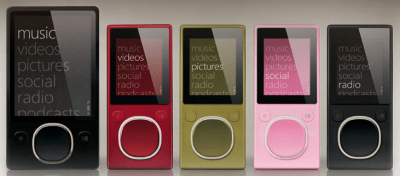
    Last night, Microsoft launched the second generation of their Zune personal media players. In all honesty, the players actually look pretty sharp although they resemble Apple’s previous generation of iPods.

    The big question is whether or not anyone will actually care that there is a new version of the Zune available. In all of my travels, I have not yet run into one person who owns a Zune, and most of the people I work with are technology workers. I would have expected to see at least one of those guys with a Zune especially considering their allegiance to Microsoft’s server and development products, but that is not the case at all. I’m sure most of you can guess which player they have. That’s right; it’s an iPod! Even with people that usually swear by Windows and Microsoft’s other products, they turn to Apple for their music and video playing pleasure.

    Engadget did a nice side by side comparison of the Zune and iPod, and on the surface, the Zune has a wider feature set, but they left out one very important specification. They left out the cool factor. Apple has created an aura of cool around their products like no other company in history. When it comes to cool, it is very difficult for a company to compete with Apple, and in the media player business, cool matters. People don’t want to walk around or ride a train or plane with some lame piece of hardware. What would people think? They want the coolest thing on the market, and right now, that is the iPod.

    I am glad to see Microsoft is introducing new Zunes because it will push Apple to make their products even better, but I’m afraid that the poor old Zune will be an afterthought before it even gets started.

  • Are You Telling Me My Power Mac Is Almost Vintage?

    I read on TUAW last week that the next version of Mac OS X will come very close to making my Power Mac G4 a vintage machine. It seems the minimum system requirements for Mac OS X Leopard will call for at least an 800 MHz G4 processor. If not for all of the upgrades I’ve done over the years, my poor old 400 MHz Sawtooth would have been history a long time ago. I mean, really, it’s almost eight years old! Right now, I’m running a 1.4 GHz G4 processor and an upgraded video card. I also have 1.5 GB of RAM so I should be in okay shape. It should be interesting to see if my Mac chokes on Leopard. It runs Tiger like a champ so I have high hopes.

    I have resigned myself to the fact that this will probably be the last Mac OS upgrade for this computer. I have heard rumors that the next version will only support Intel-based Macs, but I find that difficult to believe with all of those G5 Macs out there. I do suspect that G4s may be put out to pasture. My Power Mac has served me incredibly well over the last eight years, and I’m sure I will be just as happy with our next Mac, but it will be sad to see it go. With its four hard drive bays, it will probably continue to be used as a media server, but we’ll see how that goes when the time comes. I wonder what Macs will be like by the time the next version of Mac OS X comes out. I have to admit, it will be fun to have a nice new machine around the house. You can’t beat that new computer smell! 🙂

  • Two Business 2.0 = One Fortune?

    Not long ago, I wrote about the downfall of my favorite magazine. This afternoon, I went out to the mailbox and found my copy of the last edition of Business 2.0. The magazine was wrapped in a plain white cover with a thoughtful little note from Time notifying me that Business 2.o was no more and that I would be receiving Fortune going forward. The note didn’t stop there, however. Not only would I not be receiving my favorite magazine anymore, I would be receiving one month of Fortune for every two months remaining on my Business 2.0 subscription.

    I don’t know about any of you out there, but this just doesn’t add up to me. Why in the world would Time think it was a good idea to unilaterally decide that their golden child magazine was some how worth twice as much as one of their other magazines. The big problem for me is that Fortune is worth nothing to me. There is a reason I read Business 2.0 instead of Fortune, and telling me that I will be losing half of my subscription months and be getting a magazine I don’t even like to read is like rubbing salt in the wound.

    Now, I understand that a lot of the old Business 2.0 team will be moving over to Fortune so I’m going to give them a chance, but you can bet that they’ll be hearing from me about the little stunt they just pulled. There should be a one to one conversion from Business 2.0 to Fortune. That is really the only fair thing that Time can do for its loyal paying subscribers.

  • Microsoft Announces Office 2008 for Mac Versions and Pricing

    Microsoft Office 2008Earlier this week, Microsoft announced versions and pricing for Office 2008 for Mac. According to TUAW, there will be three different versions to chose from: Microsoft Office 2008 for the Mac for $399.95, Microsoft Office for the Mac Home and Student Edition for $149.95, and Microsoft Office for Mac Special Media Edition for $499.95. Other than the Home and Student Edition, consumers will get a break on the price if they are upgrading from a previous version.

    Professionals will most likely need to go with the standard or Special Media Edition in order to get Exchange support, but home users will be well served by the Home and Student Edition. This edition will compete directly with Apple’s iWork and free services from Google including Gmail, Google Calendar, and Google Docs. Home and student users will need to really take some time to determine if they can live with only being able to work with these products online. If they can, they may be able to save $150 and use Google’s services instead. If they need to be able to work offline, Apple’s iWork may be an option. The suite is maturing, and it now has all of the same applications that are included in Office other than Entourage, and Entourage can easily be replaced by the Mail, Address Book, and iCal applications included on every Macintosh.

    With Apple’s and Google’s applications available to home and student users, Microsoft will have a very difficult time convincing these users that they need to upgrade to the latest and greatest version of Office. I, for one, will not be running out and buying Office this time around. It just doesn’t make sense for me to spend money on a productivity suite from Microsoft when there are cheaper or free alternatives.